 HandheldPicks
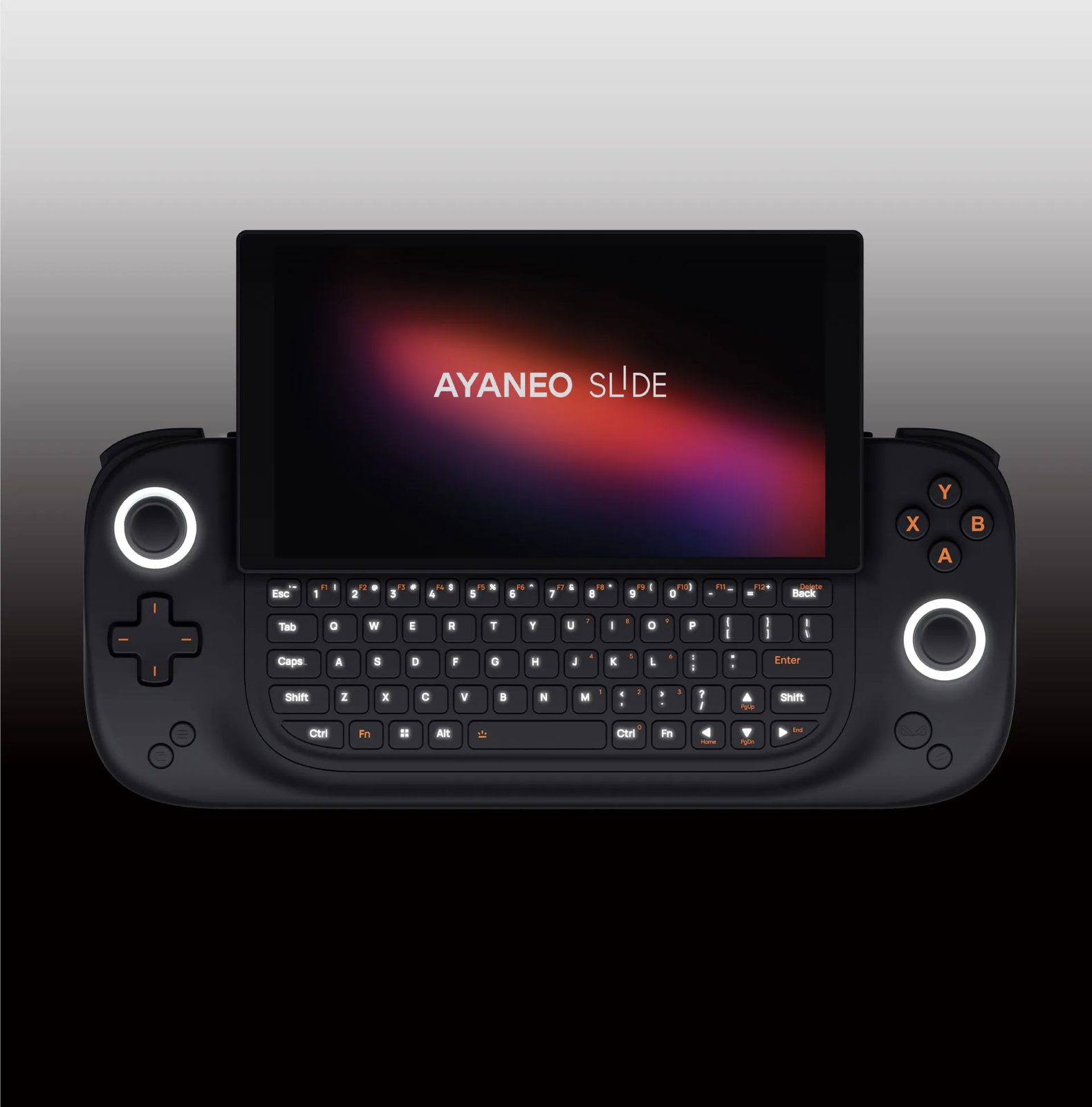
AYANEO Slide Review — A niche product perfectly executes its niche, delivering a premium sliding-keyboard experience at the cost of mainstream display features
⚡ TL;DR
At around $1,000, you are paying a premium for the sliding mechanism and built-in keyboard, which genuinely solves Windows handheld navigation woes. However, the 60Hz native-portrait display and thick chassis mean you have to really want that keyboard to justify choosing this ove
◈ Verdict: Depends on Use Case
What people are saying
Sources disclosed below
Pros
- +Incredibly creative and universally praised VHS-themed packaging
- +Highly satisfying, spring-loaded sliding screen mechanism with adjustable tilt
- +Physical keyboard genuinely solves Windows 11 navigation frustrations
- +Dense, premium build quality that feels high-end
- +Strong gaming performance from the Ryzen 7 7840U APU
Cons
- −Display is only 60Hz and lacks VRR, lagging behind competitors
- −Native portrait display causes issues with some software overlays
- −Chassis is noticeably thick and heavy
- −6-inch screen size makes Windows UI and game HUD elements tiny
- −High price tag compared to mainstream alternatives like the ROG Ally
Marcus Chen
Published April 30, 2026
$999–$1199
Price may vary. Updated regularly.
AYANEO’s new handheld brings back the T-Mobile Sidekick era, but is a hidden keyboard worth $1,000? It’s a question that forces you to choose between the cold, hard logic of specs and the warm, fuzzy feeling of pure, unadulterated nostalgia.
What you're actually getting
The AYANEO Slide is a device that feels like it was engineered by someone who spent too much time on forums complaining about Windows 11 navigation. When you pick it up, you’re immediately struck by the density. As Retro Game Corps noted, "This thing is impressively hefty. Not only is it quite thick, but it's also very dense feeling." It doesn't feel like a toy; it feels like a piece of premium hardware that demands space in your bag.
The star of the show is the sliding mechanism. It’s a tactile, spring-loaded delight that channels the spirit of early 2000s smartphones. Taki Udon hit the nail on the head when he said, "It clicks into place kind of satisfying, just like on a T-Mobile Sidekick if you owned one." That mechanism hides a physical keyboard that, while cramped, is a godsend for anyone who has spent ten minutes fighting with the Windows on-screen keyboard to type a Wi-Fi password.
However, you aren't just paying for the hinge. You’re paying for a premium, boutique experience that starts the moment you open the box. ShortCircuit joked, "Even if the AYANEO Slide was the worst product ever, I'd probably still love it because this is the cutest packaging." It’s a VHS-themed presentation that sets a high bar, but once the honeymoon phase ends, you’re left with a device that makes some very specific, very questionable trade-offs to keep that keyboard in the chassis.
Performance — what reviewers actually measured
The Ryzen 7 7840U is a proven workhorse, and it keeps the Slide competitive in modern titles. Just don't expect it to push the boundaries of high-refresh-rate gaming.
| Game/Metric | Setting | Result |
|---|---|---|
| Doom Eternal | 1080p, Med, 28W | 50-55 FPS |
| Cyberpunk 2077 | 900p, Low, 18W | 72 FPS |
| Forza Motorsport | 900p, Low, 28W | 63 FPS |
| Helldivers | 900p, Low, 18W | 72 FPS |
| Chassis Temp | 28W Load | 106°F |
Where it actually wins
The Slide wins by solving the "Windows problem." Most handhelds are great for launching a game, but the moment you need to troubleshoot a driver or type a command, you’re stuck in a nightmare of touch-screen menus. The physical keyboard here isn't just a gimmick; it’s a functional tool. ETA PRIME admitted, "I do find myself using the built-in keyboard more than the onscreen keyboard," and that’s the highest praise a feature like this can receive.
Beyond the keyboard, the build quality is top-tier. AYANEO has mastered the art of making a handheld feel like a luxury item. The screen tilt adjustment is a thoughtful touch that makes the device much more comfortable to use on a desk or a tray table than a fixed-screen handheld. If you value a device that feels like it was built to last and offers a unique, tactile experience, the Slide delivers in spades.
Where it falls short
The display is the biggest point of contention. In an era where the ROG Ally and Legion Go are pushing 120Hz and VRR, the Slide is stuck with a 60Hz panel. It’s a glaring omission at this price point. Furthermore, the 6-inch screen size makes Windows 11 elements look microscopic. You’ll be squinting at HUDs and menus, which feels like a step backward compared to the larger, more legible displays on competing devices.
Then there’s the ergonomics of the keyboard itself. While it’s better than no keyboard, it isn't perfect. As noted by ShortCircuit, you have to stretch your thumbs in ways that feel unnatural to reach the middle keys. Additionally, the D-pad is a polarizing mess. While some reviewers found it serviceable for fighting games, others—like Retro Game Corps—found it prone to accidental diagonals, which is a dealbreaker if you’re planning to use this for retro platformers.
Should you buy it?
Buy if you
- Are a power user who constantly tinkers with Windows settings and hates on-screen keyboards.
- Value premium, dense build quality and a unique, satisfying form factor.
- Play PC-centric titles that require frequent keyboard input.
Skip if you
- Prioritize high-refresh-rate gaming and VRR for smooth motion.
- Are a retro gaming enthusiast who needs a precise, reliable D-pad.
- Are budget-conscious and want the best performance-per-dollar ratio.
A beautifully built, nostalgic powerhouse that trades modern screen specs for the sheer convenience of a physical keyboard.
Sources consulted
- ShortCircuit — It feels like there’s something good in here… - AYANEO Slide
- Retro Game Corps — AYANEO SLIDE In-Depth Review
- Taki Udon — A 'Retro' PC Handheld with Keyboard // AYANEO Slide Review
- ETA PRIME — The Ultimate AMD Powered Handheld Sidekick? AYANEO Slide 3 Month Review
Synthesis combines independent reviews above. Verdicts and quotes attributed to original creators. Affiliate disclosure: we may earn a commission from qualifying purchases via Amazon links.
Products covered in this review
Frequently Asked Questions
Is the AYANEO Slide worth buying?
At around $1,000, you are paying a premium for the sliding mechanism and built-in keyboard, which genuinely solves Windows handheld navigation woes. However, the 60Hz native-portrait display and thick chassis mean you have to really want that keyboard to justify choosing this over cheaper, 120Hz VRR alternatives.
Who is the AYANEO Slide best for?
Power users who hate navigating Windows with joysticks and gamers who play PC-centric titles requiring frequent keyboard input.
Who should skip it?
Budget-conscious gamers, retro platformer enthusiasts, and those who demand high-refresh-rate VRR displays.