 HandheldPicks
Miyoo Mini Plus V4 Review — A beloved, out-of-stock darling returns with a new V4 iteration, only to disappoint purists with a flawed display, pushing most gamers toward its larger sibling
⚡ TL;DR
The V4 brings back the beloved micro-form factor and finally adds modern USB-C PD charging. However, the new 750x560 screen introduces annoying scaling issues and color tinting that downgrade the visual experience compared to previous iterations. Unless you absolutely need the sm
◈ Verdict: Depends on Use Case
What people are saying
Sources disclosed below
Pros
- +Incredibly small and lightweight form factor makes it the ultimate pocketable handheld
- +Excellent, soft-membrane d-pad and face buttons that are highly accurate
- +Onion OS custom firmware completely elevates the software experience
- +The V4 model finally supports USB-C to USB-C Power Delivery charging
Cons
- −The new 750x560 screen resolution causes awkward scaling issues for 480p games
- −Out-of-the-box display suffers from a blue/green tint and washed-out colors
- −Stock OS and the included SD card experience are messy and subpar
- −Cramped ergonomics make it uncomfortable for users with larger hands
Marcus Chen
Published April 30, 2026
$65–$89
Price may vary. Updated regularly.
The Miyoo Mini was a phenomenon, a tiny retro powerhouse that vanished almost as quickly as it appeared. Now, it's back in a new V4 iteration, but this isn't quite the triumphant return fans hoped for. Brace yourself, because while it still fits in your coin pocket, a controversial screen choice might just tarnish its otherwise stellar reputation.
What you're actually getting
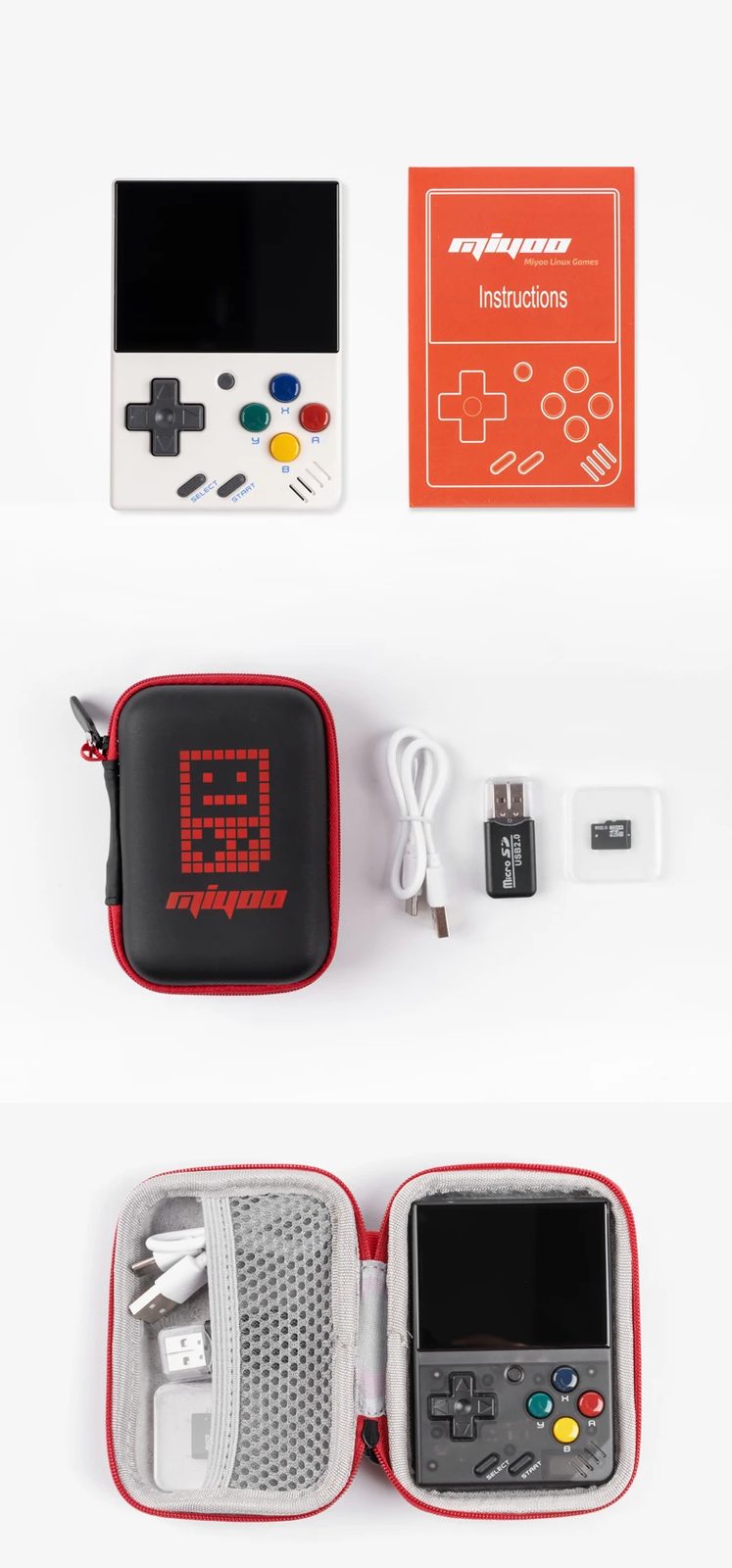
Look, the Miyoo Mini V4 is still undeniably the king of ultra-pocketable retro gaming. At a mere 100g, it’s so small it practically disappears in your pocket, making it the ultimate "take everywhere" device. As TechDweeb puts it, "This thing is so small that it can live in my pocket and because of that it goes everywhere with me." That core appeal hasn't changed. You're getting a device with fantastic, clicky buttons and a d-pad that feels just right for classic games. And let's be real, the moment you slap Onion OS on this thing, the software experience transforms from a messy headache into pure retro bliss. The V4 even finally brings USB-C to USB-C Power Delivery charging, which is a huge quality-of-life upgrade.
But here's the rub: the screen. Miyoo made a baffling choice with a new 750x560 resolution display. While some might argue it's sharper, it introduces awkward scaling issues for the 480p games you'll mostly be playing. More critically, out of the box, it often suffers from a noticeable blue/green tint and washed-out colors. Retro Game Corps didn't pull any punches, stating, "The version 4 Miyoo Mini has probably the least accurate colors, and it's very difficult to dial in those saturation levels." This isn't a minor flaw; it's a fundamental part of the visual experience.
So, while the V4 nails the portability and controls, it fumbles the display in a way that its larger sibling, the Miyoo Mini Plus, simply doesn't. For many, the slightly larger Plus model, with its more forgiving ergonomics and better screen, will be the smarter choice. Baldly Rudy summed it up perfectly: "The more I tried to game on the Miyoo Mini V4, the more I realized I just preferred the Plus." This isn't a bad device, but it's a compromised one, and you need to know exactly what you're signing up for.
Performance — what reviewers actually measured
Don't let the small size fool you; the Miyoo Mini V4 packs enough punch for its intended purpose, but it's important to set expectations. Here's a quick look at what you're getting:
- Price: Around $61-$89. This puts it firmly in the budget-friendly category, making it an accessible entry point into retro handhelds.
- Weight: A featherlight 100g. This is where the Mini V4 truly shines, making it one of the lightest and most pocketable devices on the market.
- Screen Resolution: 750x560 pixels. This is the controversial part. While technically higher resolution than some older models, it leads to non-integer scaling for many classic 480p games, resulting in a less crisp image than you might expect.
- Battery Capacity: 2000 mAh. Expect several hours of gameplay, depending on the system you're emulating and screen brightness. It's enough for on-the-go sessions, but don't expect all-day endurance.
Where it actually wins
Despite its screen quirks, the Miyoo Mini V4 still absolutely nails several critical aspects, making it a genuinely compelling device for a specific niche. First and foremost is its size. This thing is ridiculously small and lightweight, making it the undisputed champion of pocketability. You can genuinely slip it into any pocket, bag, or even a small clutch without a second thought. It’s the handheld you take everywhere because it’s never an inconvenience. For quick bursts of retro gaming on a commute, during a coffee break, or just while waiting in line, nothing beats its sheer portability.
Then there are the controls. Miyoo consistently delivers excellent input, and the V4 is no exception. The d-pad is a soft-membrane dream, offering precise, comfortable movement perfect for platformers, fighting games, and RPGs. The face buttons are equally satisfying, with a good click and tactile response. You won't find yourself fighting the controls here; they just get out of the way and let you enjoy the game.
Finally, and perhaps most importantly, is the magic of Onion OS. While the stock software is a messy, frustrating experience, installing this custom firmware transforms the Miyoo Mini V4 into a polished, feature-rich retro powerhouse. Onion OS provides a slick interface, easy game management, save states, quick menus, and a host of customization options that elevate the user experience exponentially. It’s not just an upgrade; it’s essential, and it turns a good piece of hardware into a great retro machine. Plus, the V4 finally supporting USB-C to USB-C Power Delivery charging is a small but mighty convenience, meaning you can use your modern phone charger without a second thought.
Where it falls short
Now, let's talk about the elephant in the room: that new screen. The 750x560 resolution might sound like an upgrade on paper, but in practice, it's a downgrade for retro gaming. Most classic consoles output at 240p or 480p, and this new resolution means non-integer scaling. What does that mean for you? It means games often look softer, less crisp, and sometimes even have subtle visual artifacts that weren't present on older Miyoo Mini screens. It's not a dealbreaker for everyone, but if you're a purist, you'll notice it.
Beyond the scaling, the out-of-the-box display quality itself is a significant issue. Reviewers consistently noted a distinct blue or green tint, making colors look washed out and inaccurate. While you can tweak settings with custom firmware, it's a frustrating experience to have to calibrate your screen just to get it looking decent. This isn't the vibrant, accurate display you'd hope for in a dedicated gaming device.
And while the tiny size is a pro for portability, it's a definite con for ergonomics, especially if you have larger hands. Extended play sessions can quickly become uncomfortable, leading to hand cramps. Baldly Rudy's preference for the larger Plus model highlights this perfectly. This isn't a device built for marathon gaming sessions; it's for quick, casual play. Lastly, the stock OS and the cheap, generic SD card it ships with are genuinely terrible. You absolutely must replace the SD card and install Onion OS immediately to have a usable experience. Expect to do some setup work right out of the box.
Should you buy it?
The Miyoo Mini V4 is a device of compromises. It excels in its niche but stumbles where it matters most for many gamers.
Buy if you:
- Prioritize maximum portability above all else. You want a device that truly disappears into your pocket.
- Mainly play older retro systems (NES, SNES, Game Boy, GBA, PS1) where the scaling issues might be less noticeable to you.
- Are comfortable installing custom firmware like Onion OS right away.
- Have smaller hands or only plan for short gaming sessions.
Skip if you:
- Are sensitive to screen scaling issues or color accuracy. The V4's display is its weakest link.
- Have larger hands and find cramped ergonomics uncomfortable for extended play.
- Want a plug-and-play experience without needing to install custom firmware.
- Already own a Miyoo Mini Plus and are happy with its slightly larger size and better screen.
The Miyoo Mini V4 retains its crown as the ultimate ultra-pocketable handheld, but weird screen scaling makes the larger Plus model a better choice for most.
Sources consulted
- Retro Game Corps — Miyoo Mini Plus In-Depth Review
- TechDweeb — My Favourite Thing
- Retro Game Corps — Miyoo Mini v4 Review: Kind of a Downgrade
- Baldly Rudy — Do NOT Buy a Miyoo Mini V4! (here’s why)
Synthesis combines independent reviews above. Verdicts and quotes attributed to original creators. Affiliate disclosure: we may earn a commission from qualifying purchases via Amazon links.
Products covered in this review
Frequently Asked Questions
Is the Miyoo Mini Plus V4 worth buying?
The V4 brings back the beloved micro-form factor and finally adds modern USB-C PD charging. However, the new 750x560 screen introduces annoying scaling issues and color tinting that downgrade the visual experience compared to previous iterations. Unless you absolutely need the smallest device possible, the Miyoo Mini Plus is the safer bet.
Who is the Miyoo Mini Plus V4 best for?
Gamers who prioritize maximum portability and want a device small enough to carry everywhere.
Who should skip it?
Gamers with larger hands or those who are sensitive to screen scaling and color accuracy issues.